 VISTARA
Keep the work moving
Keki is a Mac menu-bar app that connects to the coding agents you already run. When one of them needs you, a card pops up in whatever app you're using.
Works with Claude Code, Codex, Cursor and Grok on Apple Silicon Macs.
Keki was designed with Zac (@zacxbt)

Step 1
Your agent pauses and pings Keki.
When your agent has a question or wants your OK to run something, its hook passes the request to Keki. The agent then waits about a minute for your answer.
Keki sits on top of the Vistara window with a slow halo behind it. A “needs you” row slides in. Keki’s crest turns amber, it hops down into the space above the row, taps it once so the row glows, and says “This one’s waiting on you.”
Step 2
A card shows you what an agent needs.
The card appears next to your cursor and quotes the agent's own words. Each request gets a separate card. There are two kinds:
- Question cards list the agent's options by number, with a box for typing your own answer.
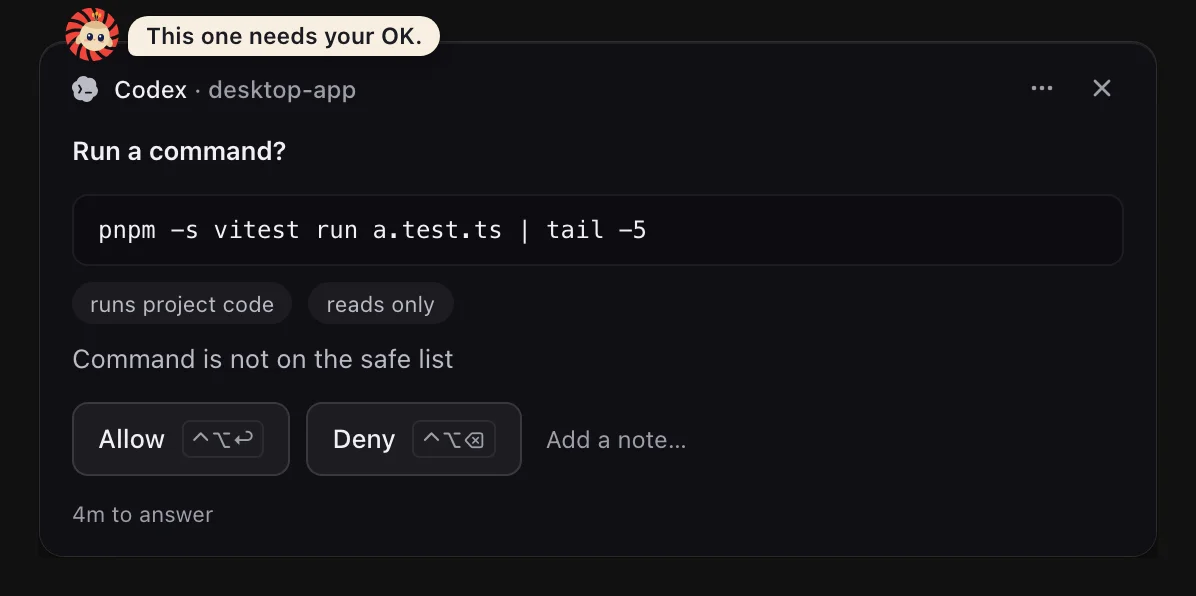
- Approval cards show the command the agent wants to run, what it does and how risky it is, with Allow and Deny buttons.
A browser shows a docs page. A Vistara card slides in next to the pointer: Claude asks which export format the nightly job should write. Keki hops onto the card and says “This one’s waiting on you.” ⌃⌥1 picks the first option, Keki nods (“Answered.”) and the card folds away.
Step 3
The agent gets your answer and keeps working.
Click an option or type your own answer. The shortcuts below do the same from the keyboard. Keki passes your answer back through the hook without typing it into your terminal.
- ⌃⌥↩Allow
- ⌃⌥⌫Deny
- ⌃⌥1–9Pick an option
- EscSend the question back to the agent
If that minute runs out before you answer, the question goes back to the agent and you answer it there.
Messages
Messages go to the session you picked.
Besides answering questions, you can message a session yourself, from a card or from that session's page in Keki. Keki sends only when you click, press a shortcut or hit Enter. It finds the session by its id, so it never has to guess which window is the right one.
A session view in Vistara shows Claude’s last message about the release notes. A reply is typed into the “Reply to Claude…” box and sent. It appears as a bubble with “Sending…”, then “Sent · waiting for it in the conversation”, then “Delivered ✓”, and the session turns to Working.
Points
Earn Vistara Points while Keki runs.
Keki includes a node, the part of the app that earns your points. The node earns while Keki is open and each time one of your agents finishes work.
About once a minute, the node sends Vistara's points server a short signed note: that a task finished, when it finished, and its session id.
*Points measure your contributions to Vistara during our Beta Phase.

Join our beta today.
Get Keki free on Mac, for anyone running Claude Code, Codex, Cursor or Grok.